
RPG Maker MZ Plugin: Equipment Evolution
Equipment Evolution
Hello! Thank you very much for your interest in our plugin:
Equipment Evolution.
Before we continue, we would like to remind you that all of our plugins work within the environment:
RPG Maker MZ ↔ PC Windows ↔ NWJS
If you use other platforms or devices, we cannot guarantee correct operation because unfortunately we have no way to test them. Please keep this in mind before proceeding.
Below you’ll find more details about what this plugin offers.
Plugin Overview
| Name of the plugin | Equipment Evolution |
| Platform: | RPG Maker MZ |
| Available versions | Demo: Yes | Full: Yes |
| Sample project included? | No |
FULL-EXPERIENCE MODE
Plugin Details: Equipment Evolution
This plugin allows you to add a real equipment evolution system to your game. Weapons and armor can evolve into stronger, higher-grade versions as your players progress through battles, quests, and story moments.
By meeting specific requirements, an equipped item can evolve to a higher tier, gaining better stats and new abilities.
Features
- Progressive Equipment Upgrades: Set up multiple levels of evolution for any weapon or armor in your database. As players upgrade their gear, the item inherits the strength, stats, and special traits of higher-tier equipment, making every evolution step impactful.
- Custom Growth Conditions: Define exactly what the player must do to unlock the next equipment tier. You can require them to collect specific crafting materials, reach a certain character level, defeat enemies, or tie the upgrade to specific story events.
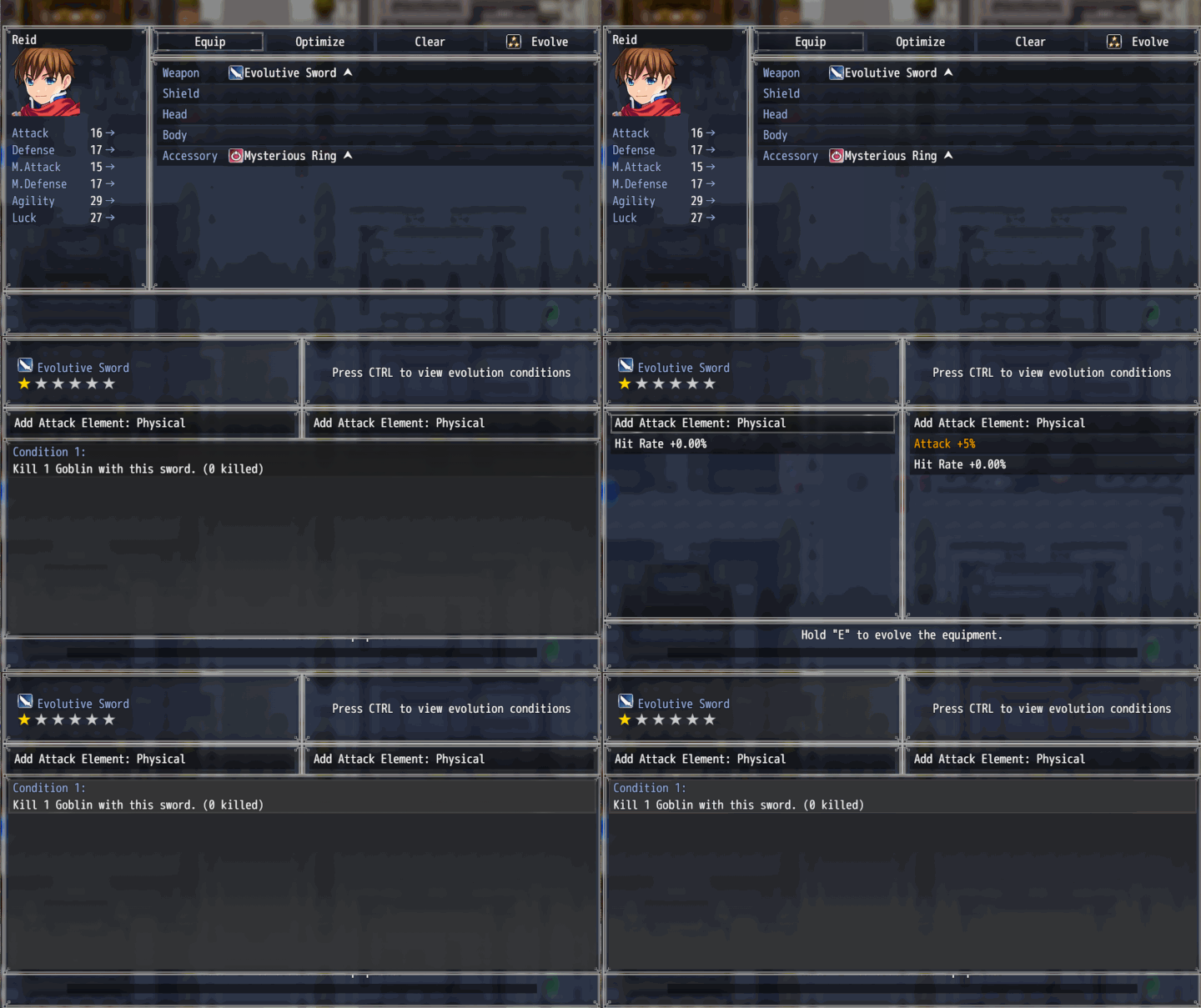
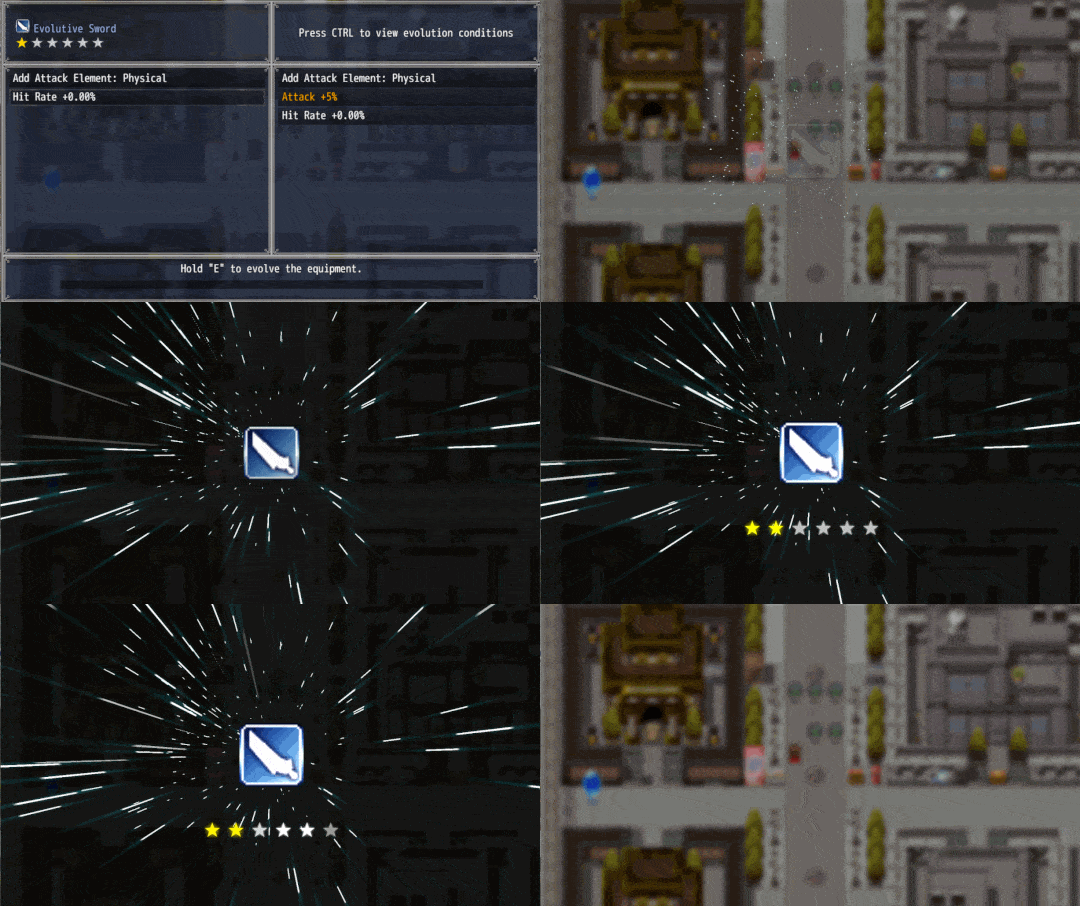
- Dedicated Evolution Menu: The plugin provides a built-in, customizable visual interface where players can check the requirements for their next upgrade. You can adjust the text, colors, key bindings, and layout settings.
Use Examples
- Growing Relics: Design a special accessory that levels up alongside your character. You can set the evolution conditions so that every time the character reaches a new level threshold, the player can upgrade the relic to gain permanent stat boosts and new passive skills.
- The Restored Hero's Weapon: Imagine the player begins the game with a classic rusty weapon. Instead of replacing it at the first weapon shop, they can upgrade it over time by gathering rare ores and reaching specific story chapters. As the adventures progress, that same starter weapon evolves into the ultimate blade.
Difficulty of use of this plugin:
This plugin must be considered as difficulty: Easy
Differences between the Versions
Demo versions are early builds of the plugin. They have fewer features and differ significantly from the full releases. However, they serve as examples: they allow you to quickly grasp what the plugin can do and often provide enough functionality for smaller projects.
Demo versions do not receive direct updates. As they are early editions, their contents have been improved and updated in the full versions. The demos are free to download on itch.io using the “Download Demo” button.
Full versions are the complete releases of the plugin. They include all features and receive ongoing feature updates and constant support. (Remember that support is always provided for the most recent version of the plugin.)
For more information about versions, updates, and support, please visit our support page:
If you have any questions or suggestions, we would love to hear from you and help.
What is a FULL EXPERIENCE MODE plugin?
At Undermax we always want you to have the best experience, and we know that DEMO versions don't always showcase all the plugin's capabilities. Maybe you're unsure whether to buy the FULL version of the plugin. That's why, in some of our plugins, you can download and run a demonstration example of that plugin in its FULL version so you can try it in a closed and safe environment.
This lets you explore in greater detail those features and improvements that the DEMO version doesn't offer.
Keep in mind that the FULL EXPERIENCE MODE only lets you run the plugin in this project and it will not be compatible with other personal projects. This means you wouldn't have access to the original plugin file, which you would receive if you purchased the FULL version.
FULL EXPERIENCE MODE plugins are only compatible with PC devices running Windows, which is the environment we work with.
For more information on this topic, visit our website or contact us directly through our support page: https://undermax.online/undermax/support.html
Additional Information
All of our plugins are built to work with RPG Maker MZ in its vanilla state: Without other plugins installed. We strive for maximum compatibility, but not all plugins can be guaranteed to work together 100%. We encourage you to test combinations and contact us if you have questions so we can help ensure you have the best experience.
Our priority has always been, and will continue to be, providing innovative, easy-to-use plugins and helping your game reach the next level!
How to Get the Plugin
You can buy and download all of our plugins through the itch.io platform. This allows you to download them as many times as you like via "My Collections":
In addition to purchasing the plugin on itch.io, you can also do so on our official website:
https://undermax.online/buy-plugins-credits/.
* Prices may vary according to taxes and withholdings depending on your country.
Video & Sample Project
Most of our plugins come with an explanatory and demonstration video. These videos help you see how the plugin works before you buy. All videos are recorded using the full version of the plugin, so you can learn about its use, requirements, installation methods and configuration in more detail. It’s important to watch these videos so you can see the plugin in action.
Many plugins also come with a sample project. This not only provides you with the plugin file, but also an RPG Maker MZ project containing a simple example so you can see how it’s configured. Studying the demo will make it easier to implement the plugin in your own project. We encourage you to explore the demo to get the most out of the plugin!
Language & Documentation
Plugin language and documentation: all of our plugins are developed in English and include documentation to help you discover all of the additional features and options that might not be shown in the sample project or video. Be sure to read the documentation so you don’t miss anything.
Plugin Parameters & Arguments
Plugin parameters and arguments: most of our plugins include a description of each parameter and argument, making it easy to understand what each item means and what aspect of the plugin you are modifying.
Terms of Use & F.A.Q
You can find all of this information on our official website. Please visit the following links for more details:
Licence Terms: https://undermax.online/undermax/LicenceTerms.html
Privacy & Refund Policy: https://undermax.online/undermax/privacy_and_refunds.html
Plugin's Codes Purchase & Redemption - Terms & Conditions: https://undermax.online/undermax/plugin-codes-terms.html
Plugin's Codes F.A.Q: https://undermax.online/undermax/plugin-codes-faq.html
If you have any questions, inquiries, or suggestions, remember you can contact us directly through our website: https://undermax.online/undermax/support.html
About Our Promotions
We regularly run exclusive promotions and discounts using the Itch.io platform, letting you acquire our plugins at a better price. We recommend visiting our Itch.io page frequently and Follow us on Itch.io.
We also offer different promotions and special bundles that gather several of our plugins and let you get more plugins for a better price. You can check them out in the Promotions section on our website: https://undermax.online/promos.html
And from our main Itch.io page: https://undermax.itch.io
Still Want More?
Discover all our plugins by visiting our plugin database: https://undermax.online/
You can also use our Windows application: Undermax Cloud: https://undermax.online/undermax/cloud/download.html
And of course, from our main Itch.io page which lets you discover all our plugins quickly and easily! We look forward to seeing you! https://undermax.itch.io
We hope you enjoy the plugin and we are here to help with anything you need.
Remember that by acquiring the plugin you are supporting us tremendously and enabling us to continue creating quality content that you can bring into your own projects.
Let’s keep growing and creating more projects together!
Purchase
In order to download this plugin you must purchase it at or above the minimum price of $6.99 USD. You will get access to the following files:
Development log
- v1.1.1 AlternativeDec 31, 2025
- Update: v1.1.0Mar 04, 2025
- Alternative v1.0.2Feb 25, 2025
Comments
Log in with itch.io to leave a comment.
Hello,
I'm very interested in this plugin I really like the whole equipment evolution idea but I have a plugin that's a bit odd and was curious if you do provide compatibility help for such things?
The plugin in question effectively separates the attack and defense stats of equipment and makes them their own stats separate from the class/actor stats much like how it was in RMXP
Hi! How are you? I understand what you're saying. Let's do the following:
Contact me via email (through my support page) and I'll send you a link to try it out. If it works for you, you can then proceed with the purchase. Does this sound good to you? :)
Let's do that, I'll get in contact when I can
I work long hours during overnight shifts so it may take some time
Is there any way to open the equipment evolve scene without using a keyboard key? My game uses a non-standard equipment scene, so I need to open it some other way. I'd like to create an event (like an anvil) that opens the scene when interacted with.
I tried SceneManager.push(Scene_EquipmentEvolution); but that didn't seem to do anything.
Either a script call or plugin command to do this would be fantastic (unless there is already a way to call this scene manually that I am just missing).
Something like a command to specify an equipment slot, and if that slot has an item which can evolve, open the scene for that item, and if not, run a common event (so a failed message can be shown).
Hello! I understand what you need. What happens is that the plugin uses the information from the Actor / Equipment that the user has equipped to obtain the information needed to open the scene and retrieve the data the plugin requires to function. I’ve updated the plugin to version ALTERNATIVE v1.1.1, which should provide you with a plugin command that might help you solve it. Keep in mind that, due to time constraints, I haven’t had the chance to do a detailed review of its functionality, so I invite you to test it, and I hope it manages to resolve what you need.
Sending you my best and a very Happy New Year!
Thanks for working on this request!
I've updated to the Alt 1.1.1 version and ran the plugin command, however nothing happens unfortunately. I have a weapon equipped which is set up in the plugin parameters to evolve, however running the command doesn't do anything (doesn't open any char select menu or anything).
Hey, just checking if you were able to get this plugin command working. It sounds like this would solve my issues if it can be done. Thanks!
Good morning! Sorry for the delay in responding, I'm currently on vacation.
I've tested the plugin and it's working correctly for me. Most likely, your plugin file is either corrupted or misconfigured in your project. I recommend doing a clean installation of it. You can even try it in a brand new clean project, make sure to configure everything properly.
I've attached on Itch.io a demo of the project I used for testing, and you’ll be able to see how the plugin works correctly with the plugin command.
I hope you manage to fix it soon ^^
Cheers!
Ah, it seems it was a configuration problem. Copying your config fixed it!
One small issue though: it seems there is a problem with the offset for the items in the equipment slot list. The last item wont show the item in the slot, and scrolling down the window always cuts off the currently selected item. I think it is an issue with the "Equipped Items" title at the top of the item list, as the missing bit of space is always about the same as the height of that title. That, or it is just not scrolling enough to fit the full item slot name and the item into frame, just the title.
Here is an image of what I mean (all slots are cut off like this when you scroll, and you cant see the item in the last slot, as it wont scroll lower)
Thank you for the reference image. I understand, I'll see what I can do to fix it during the week. ^^
I found in the video it stated that it needs to use "E" and "Ctrl" to evolve... So is it not compatible with Android? which has no keyboard to use
Just an FYI: Never try to get in touch with the VisuStella 'team'; you'll never get a decent response from them. There are better plugins and plugin creators doing basically the same thing without the toxicity (and lack of transparency or legal parity) of VisuStella.
Yeah... it’s really a shame because many of his plugins are very interesting and great, and I understand they’re used by a lot of people and he has a lot of responsibility, but it’s also true that his customer support could be better. I’ve tried several times to get in touch and unfortunately haven’t received any response.
And since everything is encrypted, it’s impossible to work on or release compatibility patches, which I personally think is wrong — I mean, if you’re paying for the plugin, the code shouldn’t be encrypted. I encrypt the code only for the DEMO versions of my plugins to protect the code, of course, but I believe that users who purchase the FULL plugin have the right to customize it however they want, if they know how to do it. Obviously, I’ll still be the one who knows how the code works, but I have to at least give people the chance to make changes if they want to. Every developer has their way of doing things, but well, I can only speak for myself, and I strive to make my products the best they can be. For me, keeping the people who trusted in my plugins happy is a priority.
It seemed to happen again when i pressed ctrl to open the condition, i couldn't close the scene, and when i tried to press the ESC button, it brought up the conditions instead, it wouldn't let me close the scene, even the X key which is an alternate to close the menu screen, it bounds to the condition pop up for some reason
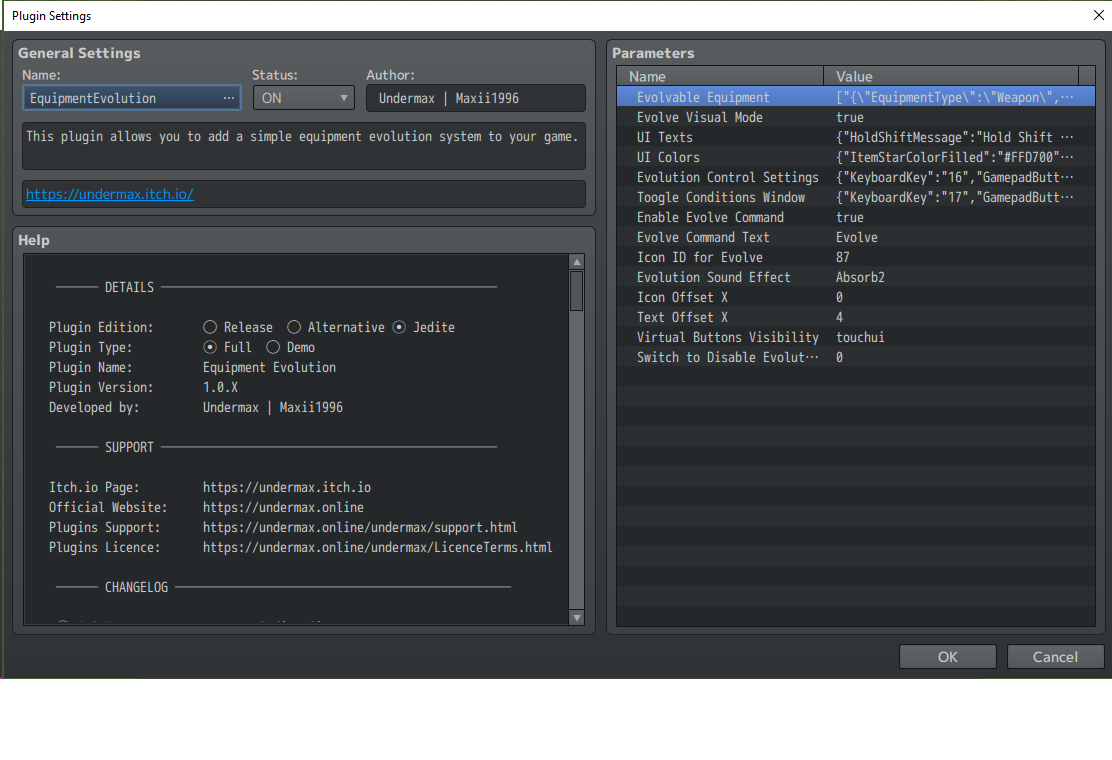
It is not a compatibility issue either as i turned all other plugins off to test it
Hello. It's really strange what’s happening to you because it doesn’t happen to me, and no one has reported a similar issue. I honestly don’t understand what could be going on—I don’t know if it’s something related to the operating system, the keyboard language, or something else—but I can't find the reason, and unfortunately, I have no way to replicate it, which makes it really difficult for me to work on something invisible to my eyes.
I have made a medium-sized update to the plugin, releasing version 1.1.0, which includes a new UI that might work better for you. I don’t like it as much as the classic version, but maybe it will work better for you. Try it out and let me know what you think.
Would the trait note tags from visutella plugins carry over when evolving
Hi. It shouldn't. Since the plugin is made to get the traits of the equipment you choose only. It doesn't get other parts like the notes. Remember that I can't guarantee compatibility with other plugins like Visustella's since they affect many things in the base rpg maker mz.
ok thank you
one more question can you choose multiple options for ex, lets say I make a ring that can have Atk or defence can i just make the ring choose 1 or will it have to be both
Well, not at the moment. Currently if you define in the parameters to get the traits of X equipment, it will bring all the traits. Let's say there are no "routes" to choose from.However, that may open the door for a future plugin update that would allow for the ability to choose one path or another as it evolves. I won't rule out adding that feature in the future :)
Sorry to bother you again but when you save the game, press f5 to return to the title screen and press continue, your stats are reset, is that intentional or a bug?
When i close the game and open it again the stats reset too
Hello, how are you? Sorry for the delay in responding, I’ve been very busy.
Please try the latest version of the plugin (Alternative v1.0.1) to see if it works better for you and let me know.
Best regards.
hmm, i think its still the same thing, pressing f5 to return to title screen and loading your save back in still resets your stats, the level progress is still there its just the stats reset, going to the title screen through the menu works, its only if you press f5 or you close the game
Remember that in RPG MAKER MZ, F5 does not send you to the Title screen, it reloads the game.
And your project must be bugged, or you will have a compatibility problem. I have tested it in a clean project and installed the Visustella Core and I have had no problems. The character stats are maintained when the equipment has evolved.
I recommend that you try to test it in a new clean project to see if it continues to happen to you.
yeah, i did it fresh game project and only have that plugin, and it somehow still resets it
edit: It seemed to work only if visustella core is turned on, however if i have item equip core turned on, it resets it
Thanks for the video and the information. I've uploaded a new alternative version, please try it and let me know if it works better for you now.
Best regards! I'll be waiting for your feedback. 😃
hmmm, it seems when i evolve my weapon, my attack stats remain the same like i start with 25 attack, and i evolve the weapon 5 times with each weapon gaining a little more atk, but it hasn't changed, my actor is still at 25 atk, also when i evolve the weapon, can i change the weapon name? my beginner sword os ironblade and it evolves into bladelords legacy,
Hello. I recommend you watch the plugin video carefully. Remember that what you get are the traits of other equipment. And no, it is not possible to change the name of the equipment as this would generate complications. RPG Maker MZ does not handle independent objects so working with the equipment is quite complicated and there are things that are very limited by the same object.
Remember that the plugin does not change the equipment itself for another one, but what it does is obtain the properties of other equipment.
ok, so it wont increase my character stats visually? it will still say 25 atk?
In the DATABASE:
IN THE GAME:
IN THE DATABASE:
IN THE GAME:
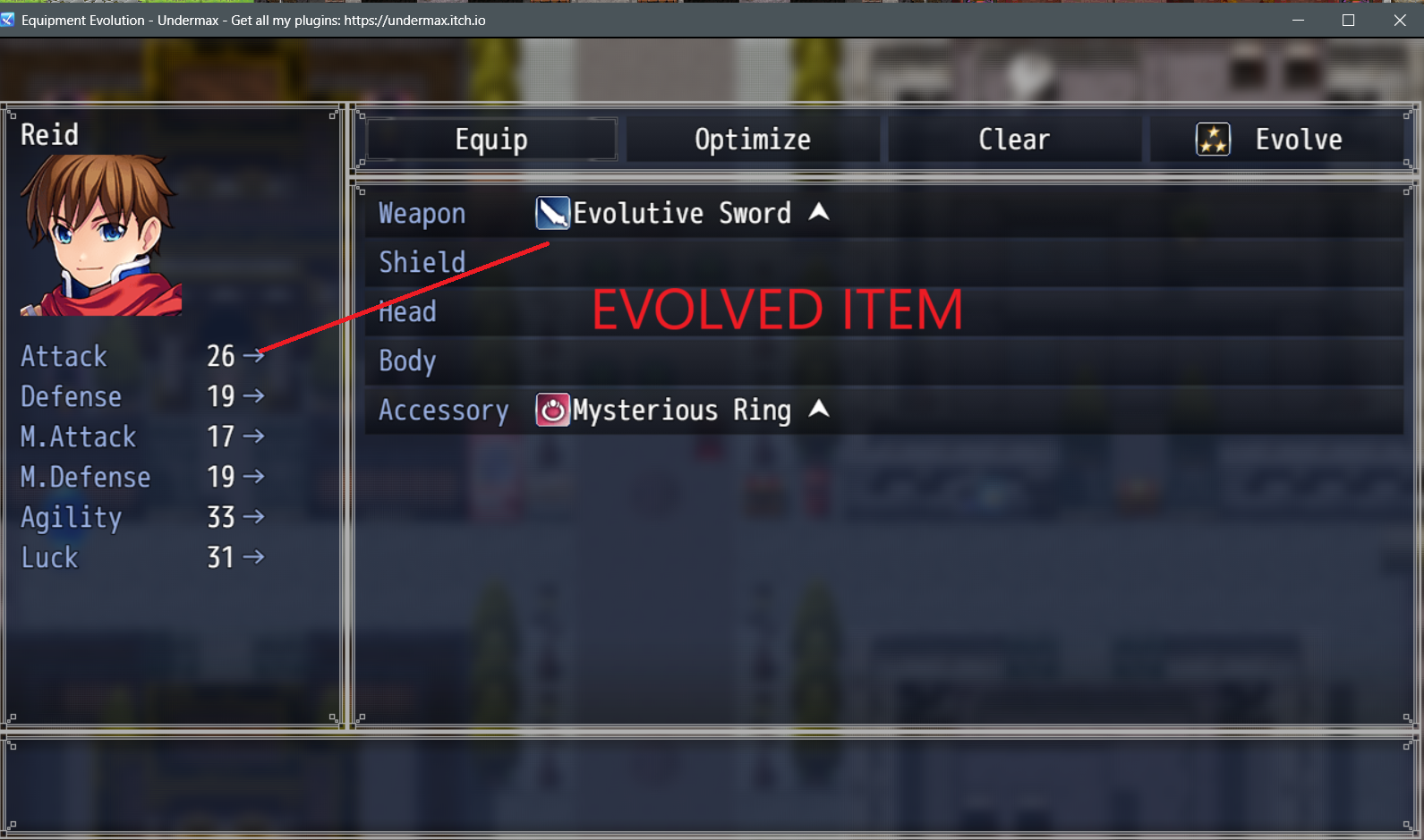
Ok, it seems to be a compatibility issue with this plugin and visustella core plugin, is there a way around it? nvm i needed item equip core to get it to work, so far it seems to be working
Hello. Yes, I understand you. Unfortunately, I don’t get along very well with Visustella’s plugins, as they are encrypted, making it difficult to analyze their code. I have tried contacting their team, but I haven't received an effective response. So, while it’s true that their plugins are excellent, they modify many aspects of RPG Maker MZ and sometimes cause incompatibilities.
I’m sorry I don’t have an exact solution. I tried making some modifications to the plugin’s code, but I’m not entirely sure it will work 100% since I haven’t had time to test it thoroughly. Try it out and let me know how it goes.
Please send me a support message through my support page so I can send you a custom version of the plugin to see if it solves the problem.
There seems to be a bug or something, in the evolving window, when i press escape to close the window, it opens the condition window instead, i have set the button to ctrl and pressing the ctrl opens the evolution window, but also the esc button does the same thing, if i meet the requirements and i evolve the weapon, then it seems to be normal, i can press esc to close window
Hello, how are you? 👋🏻 I'm glad you like the plugin, and I'm sorry to hear you're experiencing issues with it.
Mmm... What you're mentioning is really strange since it doesn't happen to me.
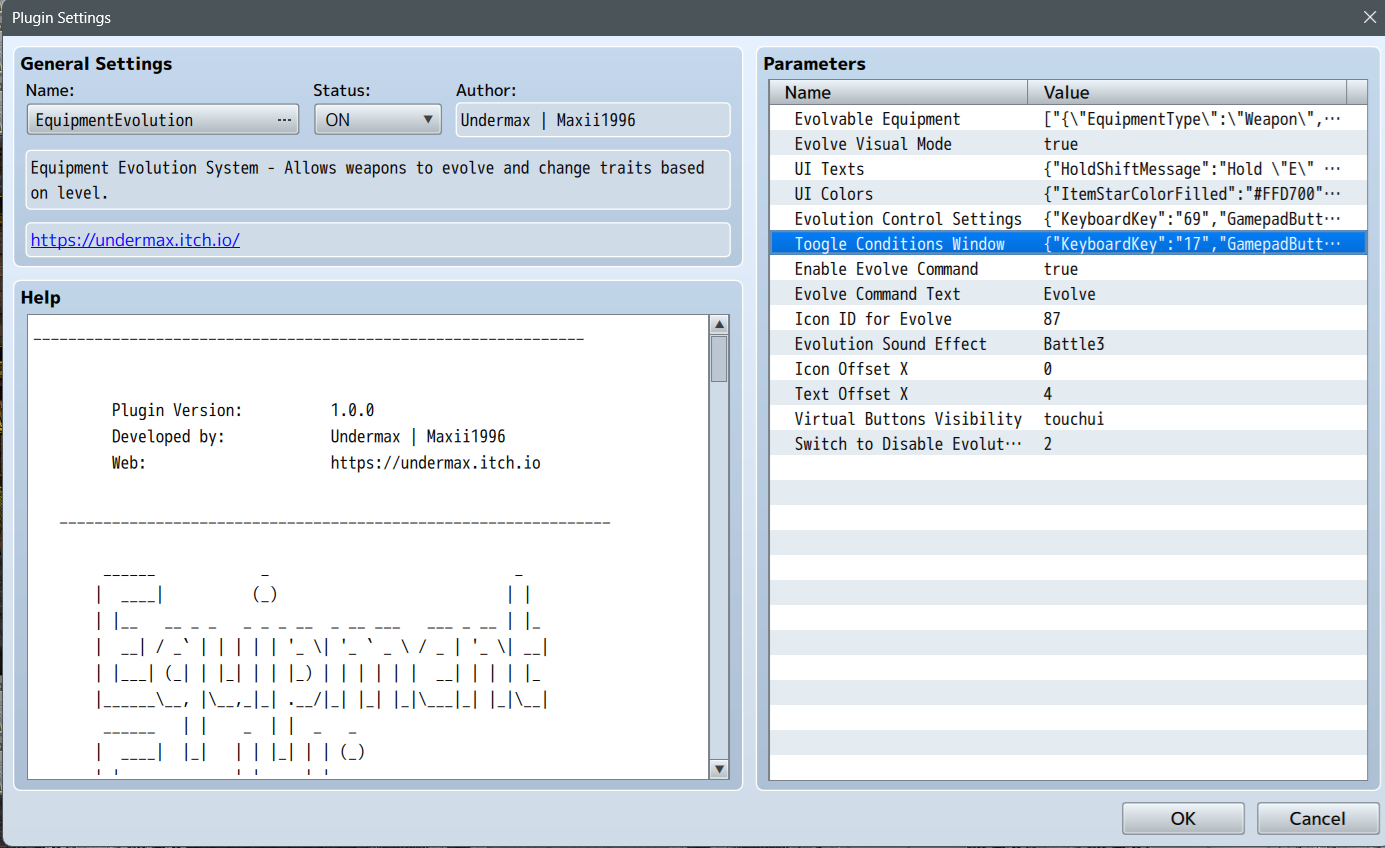
Remember that if it’s a compatibility issue, I may not always be able to help, but I’ll at least try:
First, please check all the Parameters are correctly:
If it doesnt work, I need you to do me a favor—I need to be able to replicate the error on my system so I can analyze the cause in depth and try to fix it. For that, I need you to send me a copy of your project or a technical demo so I can replicate the error. (Just attaching a debug map to replicate the situations is enough) Please remember to include everything necessary for me to simulate the same environment. Don't forget to include all resources and conditions (e.g., files, plugins, etc.), including the rpgproject file with the raw js, data, and other folders, so I can open the RPG Maker editor and run all the necessary tests.
For this, I ask you to contact me using the Support form and following the steps indicated by the system: https://undermax.online/undermax/support.html
I look forward to your response! Best regards
i just deleted plugin and loaded it again its fine now
Is it possible to change the name of a Weapon/Armor after evolution?
Including description change?
Hello. Let me explain, this plugin does not manage "Independent Items." As you already know, RPG MAKER does not have a system for managing independent items (unfortunately), making many of these plugins very difficult to handle.
This particular plugin is designed to keep the same item "ID" while inheriting traits from another, but essentially, it remains the same item.
This is why it becomes practically impossible to change its name, description, or icon without affecting all other global items.
Unfortunately, it's a complex plugin.
I hope you can understand it ^^
And sorry for any inconvenience caused.
Can you make plugin to work with Visustella Items/equips Core
Hello! Thank you for reaching out. Unfortunately, since the Visustella code is encrypted, I cannot read it, which makes it extremely difficult to understand how their plugin works and what methods Visustella uses.
I have tried to make my plugins as compatible as possible, but unfortunately, it’s not always achievable. If I manage to do it at some point, I’ll release it as an update :)
Best regards!
From what I read on the Visustella website, or on the forum page, if authors want to make patches or plugin compatibilities, they would need to contact Visu team.
Hello! That’s correct. However, I did try with other plugins in the past, but unfortunately, I never received a response from them. :(
I imagine they’re overwhelmed with a large volume of emails and simply can’t respond to everyone. That’s why I usually stick to working with RPG Maker MZ vanilla. Mixing plugins from different authors can sometimes lead to these kinds of issues, especially with complex and extensive plugins like those from Visustella.
It really makes me feel bad not being able to provide a solution every time. I’m truly sorry for any inconvenience this may have caused, and I hope you can understand.
Very understandable. Often times I've had to either drop specific plugins that don't play nice with Visu or find alternatives.
♥️