
RPG MAKER MZ Plugin: Dynamic Temperature Stats

Dynamic Temperature Stats
Hello! Thank you very much for your interest in our plugin:
Dynamic Temperature Stats.
Before we continue, we would like to remind you that all of our plugins work within the environment:
RPG Maker MZ ↔ PC Windows ↔ NWJS
If you use other platforms or devices, we cannot guarantee correct operation because unfortunately we have no way to test them. Please keep this in mind before proceeding.
Below you’ll find more details about what this plugin offers.
Plugin Overview
| Name of the plugin | Dynamic Temperature Stats |
| Platform: | RPG Maker MZ |
| Available versions | Demo: Yes | Full: Yes |
| Sample project included? | No |
FULL-EXPERIENCE MODE
Plugin Details: Dynamic Temperature Stats
With this plugin you can incorporate a dynamic temperature system into your RPG Maker MZ game. It adds environmental temperature as a meaningful gameplay element, where the surrounding climate affects your characters.
Hot deserts or freezing mountains can influence how characters feel and perform, encouraging players to adapt their strategy, manage equipment, and make careful decisions.
Features
- Dynamic Temperature Tracking:
Each character has a temperature value that changes based on the current map and weather conditions. The system automatically adjusts temperature as players explore different environments, from scorching heat to freezing cold.
- Hot and Cold Status Effects:
When a character becomes too hot or too cold, the plugin applies appropriate status effects. These can include stat changes, gradual damage over time, or other penalties.
- Visual Menu Display:
The current temperature of each character is clearly shown in the menu with color-coded indicators. This makes it easy for players to monitor their party’s condition at a glance.
Use Examples
- Survival and Exploration Challenges:
In games with harsh environments, players must prepare for temperature extremes by equipping proper clothing, using items, or finding shelter. This adds strategy and tension to exploration, especially in large open worlds or dungeon areas.
- Enhancing World Immersion:
Temperature can reflect the story’s setting — for example, a volcanic region that slowly heats up the party, or a snowy mountain pass where cold gradually weakens characters. It makes the world feel alive and responsive to player movement.
- Strategic Equipment and Party Management:
Players learn to switch between heat-resistant and cold-resistant gear depending on the area. This encourages thoughtful party preparation and turns equipment choices into an important part of gameplay.
Difficulty of use of this plugin:
This plugin must be considered as difficulty: Easy
Differences between the Versions
Demo versions are early builds of the plugin. They have fewer features and differ significantly from the full releases. However, they serve as examples: they allow you to quickly grasp what the plugin can do and often provide enough functionality for smaller projects.
Demo versions do not receive direct updates. As they are early editions, their contents have been improved and updated in the full versions. The demos are free to download on itch.io using the “Download Demo” button.
Full versions are the complete releases of the plugin. They include all features and receive ongoing feature updates and constant support. (Remember that support is always provided for the most recent version of the plugin.)
For more information about versions, updates, and support, please visit our support page:
If you have any questions or suggestions, we would love to hear from you and help.
What is a FULL EXPERIENCE MODE plugin?
At Undermax we always want you to have the best experience, and we know that DEMO versions don't always showcase all the plugin's capabilities. Maybe you're unsure whether to buy the FULL version of the plugin. That's why, in some of our plugins, you can download and run a demonstration example of that plugin in its FULL version so you can try it in a closed and safe environment.
This lets you explore in greater detail those features and improvements that the DEMO version doesn't offer.
Keep in mind that the FULL EXPERIENCE MODE only lets you run the plugin in this project and it will not be compatible with other personal projects. This means you wouldn't have access to the original plugin file, which you would receive if you purchased the FULL version.
FULL EXPERIENCE MODE plugins are only compatible with PC devices running Windows, which is the environment we work with.
For more information on this topic, visit our website or contact us directly through our support page: https://undermax.online/undermax/support.html
Additional Information
All of our plugins are built to work with RPG Maker MZ in its vanilla state: Without other plugins installed. We strive for maximum compatibility, but not all plugins can be guaranteed to work together 100%. We encourage you to test combinations and contact us if you have questions so we can help ensure you have the best experience.
Our priority has always been, and will continue to be, providing innovative, easy-to-use plugins and helping your game reach the next level!
How to Get the Plugin
You can buy and download all of our plugins through the itch.io platform. This allows you to download them as many times as you like via "My Collections":
In addition to purchasing the plugin on itch.io, you can also do so on our official website:
https://undermax.online/buy-plugins-credits/.
* Prices may vary according to taxes and withholdings depending on your country.
Video & Sample Project
Most of our plugins come with an explanatory and demonstration video. These videos help you see how the plugin works before you buy. All videos are recorded using the full version of the plugin, so you can learn about its use, requirements, installation methods and configuration in more detail. It’s important to watch these videos so you can see the plugin in action.
Many plugins also come with a sample project. This not only provides you with the plugin file, but also an RPG Maker MZ project containing a simple example so you can see how it’s configured. Studying the demo will make it easier to implement the plugin in your own project. We encourage you to explore the demo to get the most out of the plugin!
Language & Documentation
Plugin language and documentation: all of our plugins are developed in English and include documentation to help you discover all of the additional features and options that might not be shown in the sample project or video. Be sure to read the documentation so you don’t miss anything.
Plugin Parameters & Arguments
Plugin parameters and arguments: most of our plugins include a description of each parameter and argument, making it easy to understand what each item means and what aspect of the plugin you are modifying.
Terms of Use & F.A.Q
You can find all of this information on our official website. Please visit the following links for more details:
Licence Terms: https://undermax.online/undermax/LicenceTerms.html
Privacy & Refund Policy: https://undermax.online/undermax/privacy_and_refunds.html
Plugin's Codes Purchase & Redemption - Terms & Conditions: https://undermax.online/undermax/plugin-codes-terms.html
Plugin's Codes F.A.Q: https://undermax.online/undermax/plugin-codes-faq.html
If you have any questions, inquiries, or suggestions, remember you can contact us directly through our website: https://undermax.online/undermax/support.html
About Our Promotions
We regularly run exclusive promotions and discounts using the Itch.io platform, letting you acquire our plugins at a better price. We recommend visiting our Itch.io page frequently and Follow us on Itch.io.
We also offer different promotions and special bundles that gather several of our plugins and let you get more plugins for a better price. You can check them out in the Promotions section on our website: https://undermax.online/promos.html
And from our main Itch.io page: https://undermax.itch.io
Still Want More?
Discover all our plugins by visiting our plugin database: https://undermax.online/
You can also use our Windows application: Undermax Cloud: https://undermax.online/undermax/cloud/download.html
And of course, from our main Itch.io page which lets you discover all our plugins quickly and easily! We look forward to seeing you! https://undermax.itch.io
We hope you enjoy the plugin and we are here to help with anything you need.
Remember that by acquiring the plugin you are supporting us tremendously and enabling us to continue creating quality content that you can bring into your own projects.
Let’s keep growing and creating more projects together!
Purchase
In order to download this plugin you must purchase it at or above the minimum price of $3.99 USD. You will get access to the following files:
Download demo
Development log
- Added Alternative: v1.0.2-ANov 27, 2024
- Update: v1.0.1Nov 21, 2024
Comments
Log in with itch.io to leave a comment.
This is so cool. I would love to see an onscreen notifier type icon for when the player is roaming the environment, similar to survival games. Thak you so much for all the hard work you do I have a list of your Plugins unbelievably long. <3
I'll keep that in mind for the future ^^
Thank you very much for the support!
Hi there! I'm getting an error when I try to launch my main menu...it says; Type Error: Failed to execute 'Create liner gradient' on 'canvas rendering Context 2D': The provided double value is non-finite.'
I'll attach the error log, too, (let me know if it's too small to read); it's mainly showing something wrong with the VisuStella core engine and VisuStella's Item Equips core.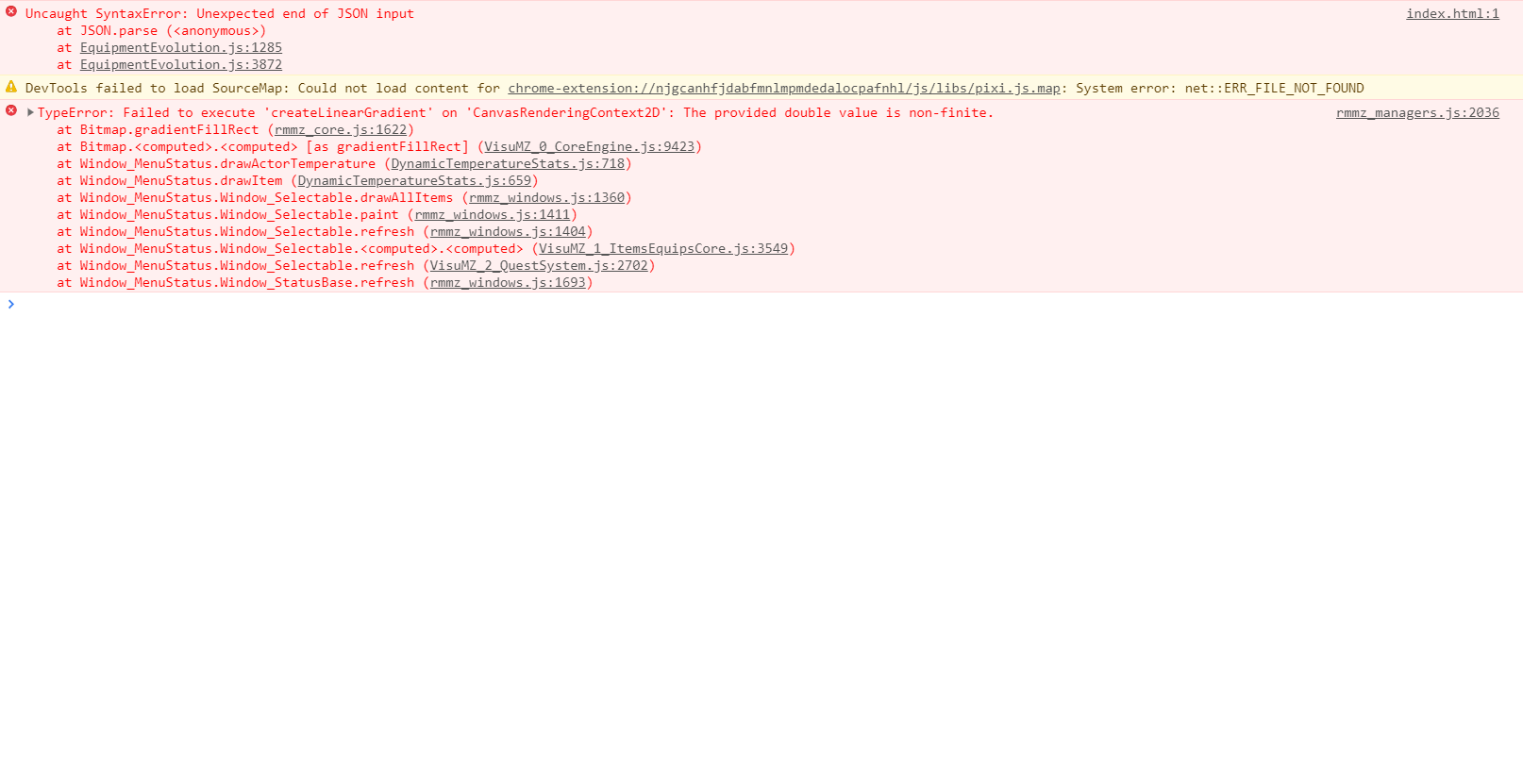
Hello. I’m sorry to hear that.
It seems you're experiencing issues with the "Equipment Evolution" plugin and Dynamic Temperature.
Please contact me on the support page:
https://undermax.online/undermax/support.html
Please attach a demo (it can be new or from your current project). You can upload it to Google Drive or any other download platform of your choice, including all the necessary files and configurations to simulate the error.
Please include:
Also, provide additional information on how to replicate the error, when it occurs, etc.
If it’s a compatibility issue between my plugins, I may be able to fix it. However, if the modification needs to be made to an external plugin not created by Undermax, I won’t be able to help as I only offer support and have access to my own plugins.
Any additional information you can provide will be very helpful. I need to replicate the error to start debugging and create a solution. Thank you very much!
Okay, thank you! I filled out a support ticket yesterday and submitted it; let me know if you didn't receive it, please!
Hello. Yes, a reply has been sent to you. Please check your inbox and spam folder. Best regards.
Thank you! I had one last question about this plugin; is there a way to turn off the hot/cold statuses while in battle? I'm using a Visustella plugin that shows states when they're applied, and it's causing the Dynamic Temperatures to pop up constantly (before an action, after an action, after a character KOs, etc..)
Hello. I have added an alternative version (v1.0.2-A) that should work better for addressing that issue. Please note that this time, I was able to make the adjustment since I have access to the "VisuMZ_3_VisualStateEffect" plugin and was able to replicate the problem. However, keep in mind that I won’t always be able to replicate issues with plugins from other authors, especially when it comes to a plugin that isn’t free. I hope I’ve been helpful. Best regards!